target 指事件源对象,点击嵌套元素最里层的某元素,该元素就是target。IE6/7/8对应的是srcElement。
currentTarget 指添加事件handler的元素本身,如el.addEventListener中el就是currentTarget。IE6/7/8没有对应属性,可在handler内使用this来替代如evt.currentTarget = this。
relativeTarget 指事件相关的元素,一般用在mouseover,mouseout事件中。IE6/7/8中对应的是fromElement,toElement。
mouseenter ,mouseleave IE9中仍然支持,另见 Greg Reimer 的博文 Goodbye mouseover, hello mouseenter 。
mouseenter与mouseover区别在于:在元素内部移动时mouseenter不会触发。如下
<!DOCTYPE HTML>
<html>
<head>
<meta http-equiv="Content-Type" content="text/html; charset=utf-8"/>
<title>mouseerter与mouseover区别(IE下测试)</title>
</head>
<body>
<div id="result" style="position:absolute;right:100px;top:5px;width:250px;height:400px;border:2px solid gray;overflow:auto;">
</div>
<h3>1,鼠标在div[id=parent1]内部移动时也会触发mouseover事件</h3>
<div id="parent1" style="width:400px;border:1px solid gray;padding:5px;">
<div id="child11" style="width:100px;height:100px;background:gold;float:left;">Child11</div>
<div id="child12" style="width:100px;height:100px;background:gold;float:right;">Child12</div>
<div style="clear:both;"></div>
</div>
<br/>
<h3>2,鼠标在div[id=parent2]内部移动时也不会触发mouseenter事件</h3>
<div id="parent2" style="width:400px;border:1px solid gray;padding:5px;">
<div id="child21" style="width:100px;height:100px;background:gold;float:left;">Child21</div>
<div id="child22" style="width:100px;height:100px;background:gold;float:right;">Child22</div>
<div style="clear:both;"></div>
</div>
<script type="text/javascript">
function on(el,type,fn){
el.addEventListener ? el.addEventListener(type, fn, false) : el.attachEvent('on' + type, fn);
}
function $(id){
return document.getElementById(id);
}
var p1 = $('parent1'),
p2 = $('parent2');
function fn(e){
var d = document.createElement('div');
d.innerHTML = e.type;
$('result').appendChild(d);
}
on(p1,'mouseover',fn);
on(p2,'mouseenter',fn);
</script>
<body>
</html>
了解了这三个属性的意义后,实现起来就简单了:
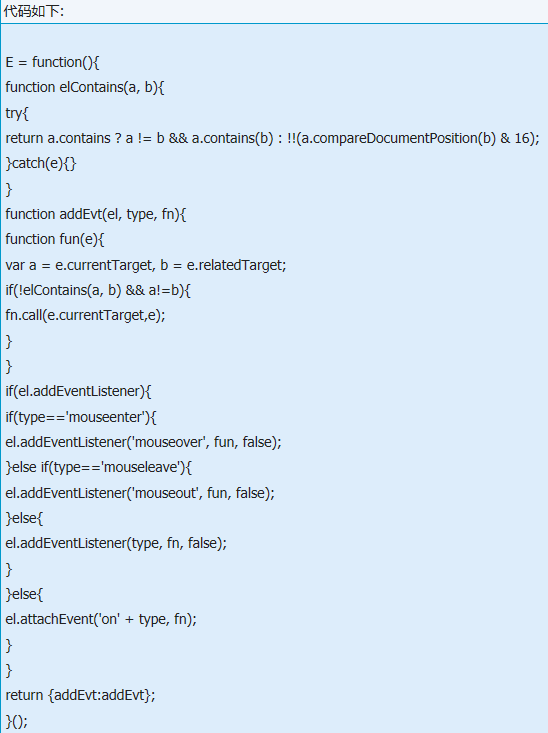
测试代码:
<!DOCTYPE HTML>
<html>
<head>
<meta http-equiv="Content-Type" content="text/html; charset=utf-8"/>
<title>mouseerter与mouseover区别(IE下测试)</title>
</head>
<body>
<div id="result" style="position:absolute;right:100px;top:5px;width:250px;height:400px;border:2px solid gray;overflow:auto;">
</div>
<h3>1,鼠标在div[id=parent1]内部移动时也会触发mouseover事件</h3>
<div id="parent1" style="width:400px;border:1px solid gray;padding:5px;">
<div id="child11" style="width:100px;height:100px;background:gold;float:left;">Child11</div>
<div id="child12" style="width:100px;height:100px;background:gold;float:right;">Child12</div>
<div style="clear:both;"></div>
</div>
<h3>2,鼠标在div[id=parent2]内部移动时也不会触发mouseenter事件</h3>
<div id="parent2" style="width:400px;border:1px solid gray;padding:5px;">
<div id="child21" style="width:100px;height:100px;background:gold;float:left;">Child21</div>
<div id="child22" style="width:100px;height:100px;background:gold;float:right;">Child22</div>
<div style="clear:both;"></div>
</div>
<script type="text/javascript">
function on(el,type,fn){
el.addEventListener ? el.addEventListener(type, fn, false) : el.attachEvent('on' + type, fn);
}
function $(id){
return document.getElementById(id);
}
var p1 = $('parent1'),
p2 = $('parent2');
function fn(e){
var d = document.createElement('div');
d.innerHTML = e.type;
$('result').appendChild(d);
}
on(p1,'mouseover',fn);
on(p2,'mouseenter',fn);
</script>
<body>
</html>
Greenfoot是一款简单易用的Java开发环境,该软件界面清爽简约,既可以作为一个开发框使用,也能够作为集成开发环境使用,操作起来十分简单。这款软件支持多种语言,但是默认的语言是英文,因此将该软件下载到电脑上的时候,会发现软件的界面语言是英文版本的,这对于英语基础较差的朋友来说,使用这款软件就会...
07-05
Egret UI Editor是一款开源的2D游戏开发代码编辑软件,其主要功能是针对Egret项目中的Exml皮肤文件进行可视化编辑,功能十分强大。我们在使用这款软件的过程中,可以将一些常用操作设置快捷键,这样就可以简化编程,从而提高代码编辑的工作效率。但是这款软件在日常生活中使用得不多,并且专业性...
07-05
KittenCode是一款十分专业的编程软件,该软件给用户提供了可视化的操作界面,支持Python语言的编程开发以及第三方库管理,并且提供了很多实用的工具,功能十分强大。我们在使用这款软件进行编程开发的过程中,最基本、最常做的操作就是新建项目,因此我们很有必要掌握新建项目的方法。但是这款软件的专业性...
07-05
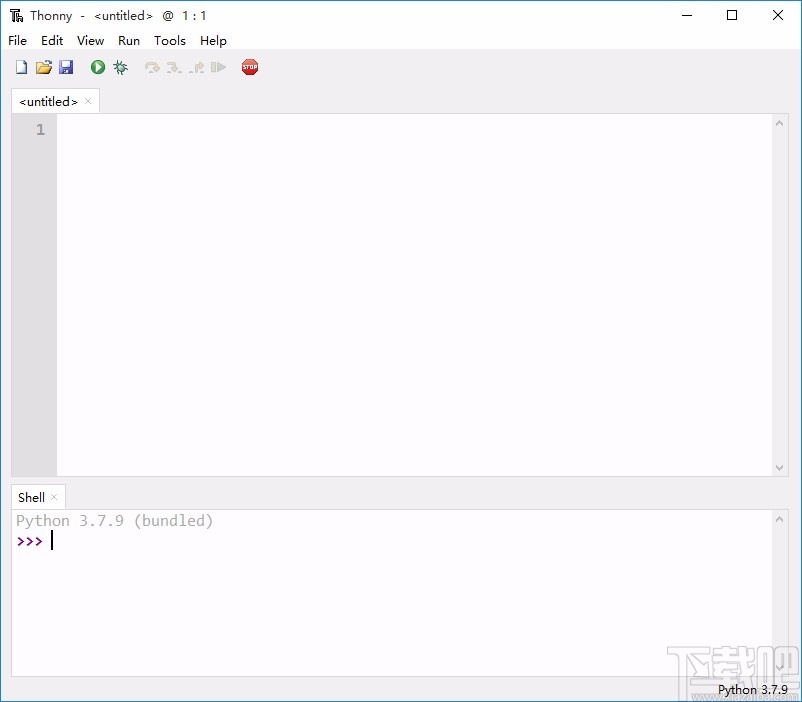
Thonny是一款十分专业的Python编辑软件,该软件界面清爽简单,给用户提供了丰富的编程工具,具备代码补全、语法错误显示等功能,非常的适合新手使用。该软件还支持多种语言,所以在下载这款软件的时候,有时候下载到电脑中的软件是英文版本的,这对于英语基础较差的小伙伴来说,使用这款软件就会变得十分困难,...
07-05